
Arc Raiders: Low-End PC Settings for Maximum FPS and Visibility
Is your PC struggling to run Arc Raiders? Learn the exact settings for GTX 1050 Ti and RX 580 rigs to hit 60+ FPS while maintaining a competitive visibility edge.
In this article4 sections
Arc Raiders is a visually stunning game, but its Unreal Engine 5 foundation can be a nightmare for older hardware. In the April 2026 Headwinds meta, the game has been further optimized, yet new lighting updates and "Static GI" changes have shifted the best practices for competitive performance.
If you're rocking a GTX 10-series, an RX 500-series, or just want to squeeze every possible frame out of your rig for a competitive edge, these are the settings you need. We are aiming for the "Competitive Sweet Spot"—zero stutters, high visibility for spotting ARC machines, and the lowest possible input lag.
1. The "Golden Rule" Display Settings
Before touching the graphics, your display mode is the foundation of your frame timing.
Window Mode: Fullscreen (Preferred for absolute max FPS) or Borderless Windowed (If you multitask).
Resolution: 1920x1080. If you are struggling below 60 FPS, drop to 1600x900 rather than using internal scaling; it keeps the UI sharper.
Frame Rate Limit: Match your monitor’s refresh rate (e.g., 60, 144, or 240). Uncapping can cause "CPU Choking" on low-end systems.
V-Sync: OFF. This is non-negotiable for competitive play due to input lag.
NVIDIA Reflex / AMD Anti-Lag: On + Boost. This is the single best way to make the game "feel" responsive even at lower frame rates.
2. Graphics Settings: Maximum Visibility Meta
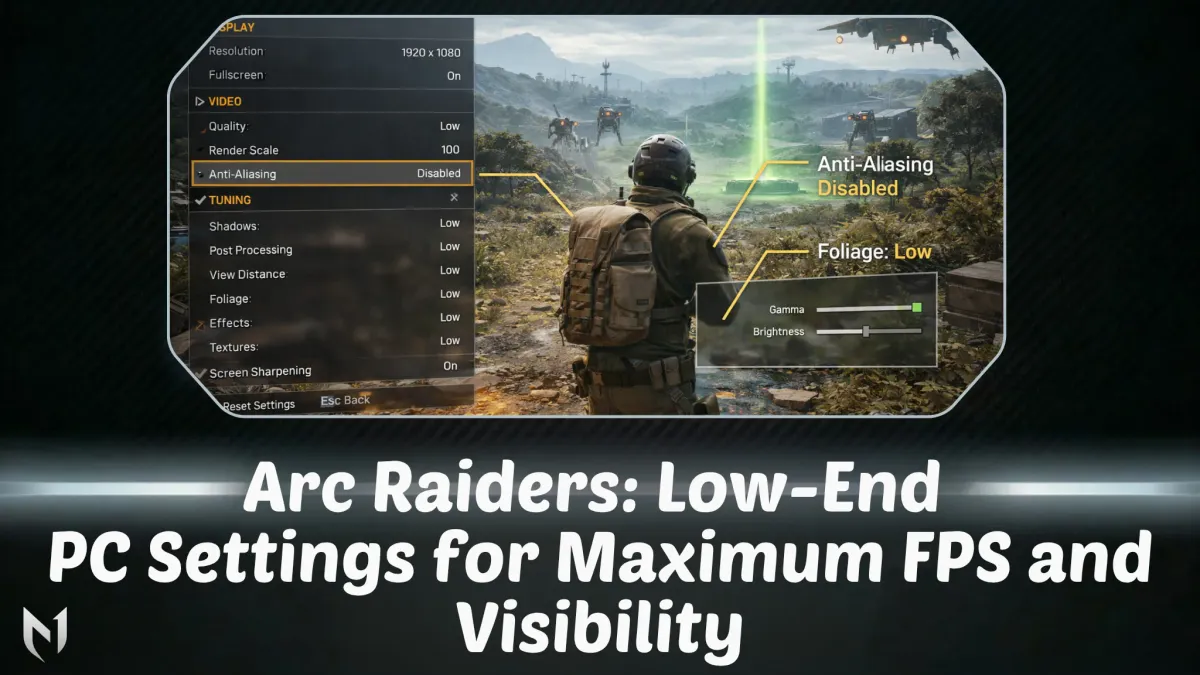
In 2026, the "Foliage" setting is your biggest enemy. Lowering it isn't just about FPS—it's about removing the grass that enemies use to hide.
Setting Value Reasoning View Distance Medium / High Crucial for spotting distant ARC patrols and snipers. Don't go to Low. Shadows Low Massive FPS boost. Makes dark corners easier to see into. Anti-Aliasing Low Removes "blur" from the image. If it's too jagged, use FSR/DLSS instead. Post-Processing Low Disables bloom and lens flare which distract during combat. Texture Quality Medium Set to Low if you have < 4GB VRAM. Otherwise, Medium keeps the game readable. Effects Low Explosions and smoke will tank your FPS mid-fight if this is high. Foliage Low Competitive Advantage: Removes excess bushes/grass where Raiders hide. Global Illumination Static (Low) Can noticeably boost FPS on its own. Disables real-time lighting bounces.
3. Advanced Video & Camera Tweaks
Field of View (FOV): 75–80. While 80 (Max) gives more peripheral vision, it taxes the GPU more. 75 is the sweet spot for low-end rigs.
Motion Blur / Depth of Field: OFF. These add artificial blur that makes spotting moving targets significantly harder.
DLSS / FSR / XeSS: Balanced. Avoid "Performance" mode as it can make the machine-glow (ARC eyes) look smeary and hard to track.
N1Boost does not offer Arc Raiders services at the moment. For ranked games such as League of Legends, Valorant and CS2, see n1boost.com.
4. Pre-Game Windows Optimization
Before you even launch the game, do these three things to free up resources:
Disable Fullscreen Optimizations: Right-click
ArcRaiders.exe> Properties > Compatibility > Check "Disable Fullscreen Optimizations."Shader Cache: In your NVIDIA or AMD control panel, set "Shader Cache Size" to Unlimited or 10GB. This fixes the "micro-stutters" when entering new areas.
Background Apps: Close your browser! In 2026, web browsers can eat up to 4GB of RAM—RAM that Arc Raiders desperately needs for its 12GB minimum requirement.
Reward boxes
Open a box, win real rewards
Spend N1 Coins to open a box and win coins, checkout discounts, or a free coaching/boost service.
Ready to climb?
Pick a service, set your options and get matched with a verified booster. Secure checkout and 24/7 support.
- VPN and offline mode
- Verified boosters
- 24/7 support